

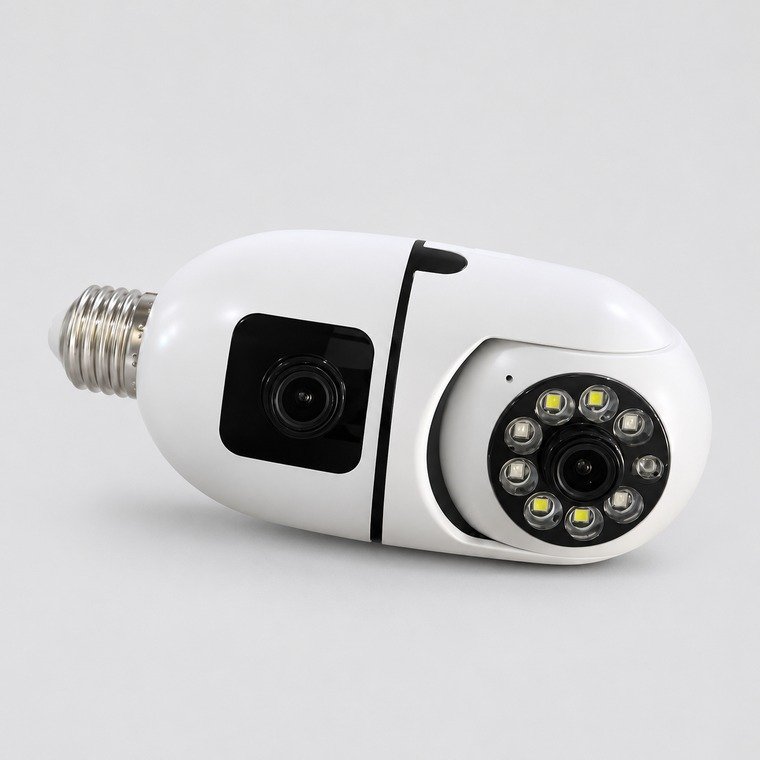


Dual Lens Bulb Camera – Two Cameras in One WiFi Bulb
Dual Lens Bulb Camera is a convenient security solution designed for users who want two camera lenses in one bulb-style device. Combining a dual-camera design with WiFi connectivity, this camera offers a practical way to monitor selected areas of your home, office, or shop.
Instead of choosing two separate camera units, this bulb-style camera brings two lenses together in one device. Its familiar bulb design also makes it a useful option for people who prefer a simple installation approach using a compatible bulb holder.
Two Cameras in One Bulb Design
The main highlight of this camera is its two-lens arrangement. Having two cameras in one device can provide additional viewing perspectives compared with a conventional single-lens bulb camera.
This design can be useful when you want to monitor different sections of a room or improve visibility around a selected area. The actual viewing coverage depends on the lens angles, camera configuration, and installation position.
For better results, install the camera where both lenses have a clear view of the areas you want to monitor. Furniture, walls, and other obstacles may still block parts of the camera view.
WiFi Connectivity for Convenient Monitoring
WiFi connectivity allows the camera to connect to a compatible wireless network, subject to the product’s supported requirements. After completing the setup through its compatible application, you can access the camera’s available viewing features on your mobile phone.
This makes it easier to check your surroundings without being physically present near the camera.
A stable WiFi connection and correct app configuration are important for convenient remote monitoring. Check the supported network frequency and application details before purchasing.
Convenient Bulb-Style Installation
The bulb-style design provides an alternative to traditional CCTV mounting. The camera is designed to fit into a compatible bulb holder, helping simplify placement in suitable locations.
Before installation, confirm the socket type and power requirements. Always follow the manufacturer’s instructions and use a suitable installation point.
This design can be especially appealing to users who want a camera setup without arranging a separate conventional camera bracket.
Suitable for Home, Office, and Shop Monitoring
A dual-lens bulb camera can be considered for different indoor monitoring needs. Depending on the viewing angles and installation location, it may be useful in:
- Living rooms and bedrooms
- Indoor entrances and hallways
- Small offices and workspaces
- Shops and reception areas
- Other suitable indoor spaces
Choose a location that offers a clear view of the area you want to monitor. Proper positioning can help you make better use of the two-lens arrangement.
A Practical Alternative to Two Separate Cameras
Installing multiple security cameras may require additional mounting points, power arrangements, and setup work. A two-lens bulb camera brings both lenses together in one device, offering a more compact approach to monitoring.
It is worth considering when you want a dual-camera design in a familiar bulb-style format. However, two lenses do not automatically guarantee complete room coverage. Check the actual viewing angles and supported camera functions to understand how the device covers your space.
Why Choose the Dual Lens Bulb Camera?
- Two camera lenses in one bulb-style device
- WiFi connectivity for supported mobile monitoring
- Convenient screw-in bulb-style installation
- Two viewing perspectives in one camera unit
- Suitable for selected indoor monitoring areas
- Practical for home, office, and shop security
- Compact alternative to separate camera units
Frequently Asked Questions
1. What is a Dual Lens Bulb Camera?
It is a bulb-style security camera that combines two camera lenses in one device for monitoring selected areas.
2. Does it really have two cameras in one bulb?
Yes, the product is described as having two camera lenses integrated into one bulb-style unit.
3. Can I view the camera on my mobile phone?
It supports WiFi-based monitoring through its compatible application. Correct setup and network availability are required.
4. How do I install this camera?
It is designed for a compatible bulb holder. Check the socket type and power requirements before installation.
5. Does having two lenses mean there are no blind spots?
Not necessarily. Two lenses can provide additional viewing perspectives, but actual coverage depends on lens angles, placement, and obstacles.
6. Where can I use this camera?
It can be considered for suitable indoor locations such as rooms, hallways, offices, and shops.
Get Two Camera Views in One Convenient Device
Choose the Dual Lens Bulb Camera for a practical combination of two camera lenses, WiFi connectivity, and a familiar bulb-style design. It is a convenient option for users who want a compact approach to everyday indoor security monitoring.




Reviews
There are no reviews yet.